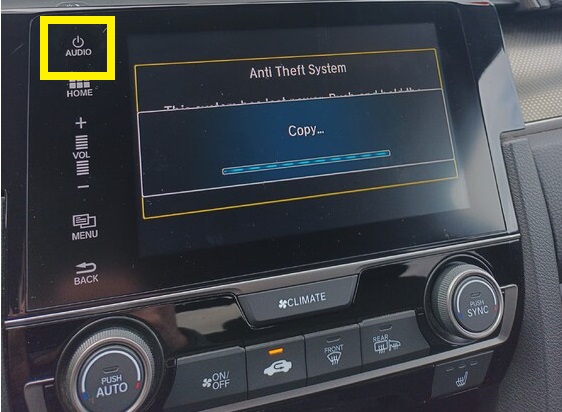
Pues en principio tendría que saltarte la actualización sin problemas, si quieres escríbeme por privado y te intento guiar un poco más porque hemos actualizado varios civics ya de compis de mi ciudad y ya casi me se el proceso de memoria.
En el proceso qué es lo que te aparece, te detecta los archivos y luego no los carga o cómo va la cosa?
Algo raro hay ahí, si el usb está en fat32 todo debería entrar automático, la forma más rápida es conectar el pen drive antes de encender el coche en el puerto usb junto al mechero y una vez arrancas el coche la tablet se inicia en el launcher de la actualización, no tienes que hacer “nada”. Te diría que revises que tanto el formato del usb está en fat32 como que no te falte ningún archivo en el usb, todo en la raíz, sin crear ninguna carpeta.
Si pudieses grabar un video del proceso como lo estás haciendo igual te podemos ayudar mejor.
Pues yo no he actualizado la tablet… la mía con ACP funciona a las mil maravillas… de hecho estaba pensando en comprarme una aftermarket xro es que no tengo ninguna queja con la de serie…
Tal vez cuando cambie el móvil… xro hasta octubre nada
Me pasa igual, para lo que la uso que es Waze con Android auto cuando viajo y Spotify me va mas que sobrada. Que si, que una aftermarket mola mucho, es más grande y va mas “acorde” con la moda de llevar una Tv en el salpicadero pero…realmente cambiarla solo por eso me daría bastante palo. Si me fallase o fuese un suplicio su uso si, pero cumple su función y me va bien
Buenos dias
No se me solucionó el problema, me dijeron que no habia version mas reciente y ma cosa se quedó ahi.
Me he acordado de escribir porque justo hoy he probado un pincho inalambrico de Android auto que compre en aliexpress por probar
Y la verdad es que no me tenia mucha fe, pero con esto se ha arreglado el problema, vale 4 duros, pero conecta al momento y en el unico viaje en el que lo he probado todo sin problemas y muy rapido, por si a alguno le puede servir.
Yo lo he conectado en el usb que hay escondido en el hueco debajo del salpicadero, y conecto el movil por cable al usb que hay en el hueco entre los dos asientos delanteros, asi puedo seguir cargando el movil.
Cuanto tardó en contestarte? porque le he mandado un par de mails tras actualizar y sin noticias de hondahack, pone algo de Twitter también pero por allí desde 2022 no se pasa…
To be honest, my car hardly ever turns on the high beams automatically. In fact, I’ve only seen it happen two or three times. I don’t know if it’s normal, but that’s how it is with mine. When I drive on the same road in my wife’s Toyota, it switches the high beams on and off all the time. Is mine malfunctioning? I don’t know, but it’s not normal that if another car turns them on, mine doesn’t.
It’s not normal, they’ve always worked fine for me. As soon as they detect low light—and if I’m not mistaken, you need to be going over 50 km/h (correct me if I’m wrong)—they activate automatically. They’re usually quite quick to turn off when they detect a car. However, if you flash your lights or turn them on manually, they stay deactivated until you restart the engine or hold the high beam lever for 40 seconds. Regards
Thanks for the thread, the software, and the PDF. I’ve read it and honestly, the update has many steps to follow; I hope I don’t skip anything and mess it up. By the way, does this update only fix GPS errors?
At the end of the PDF in point 32 it says this: “Most of the time, the system calibrates automatically during normal use, but in some circumstances, it may be necessary to perform the calibration process according to the instructions in bulletin SQ-10-001-00.” Does anyone know what that refers to, and what needs to be done if the system doesn’t calibrate automatically? I have no idea what that calibration process with that code is. What do I need to do there?
When they changed my battery a few months ago, the mechanic told me that some adjustments had to be made to the screen after installing it; I have no idea what he did. Would that have anything to do with the calibration thing?
Just yesterday they came on by themselves. I didn’t know about the speed or that if you turned them on manually for a moment or flashed your lights, they wouldn’t come on automatically anymore. Thanks.
The installation is straightforward: just extract all the files onto a USB drive formatted in FAT32. Connect it to the port next to the cigarette lighter (the one in the armrest isn’t used, and nothing should be plugged into it).
With the engine running, just follow the prompts—next, next. There will be several automatic reboots and several black screens that last for quite a few seconds. After about 15 minutes, the system will tell you that it needs to restart; do this by holding down the “audio” button on the tablet (at that point, you can remove the USB). Leave the car in an area clear of buildings so it can sync with the satellites, and it’ll be ready shortly.
Well, I had F190.96 installed and I’ve already installed the latest one, which I assume has also been out for a while now. The installation went well. However, it hasn’t solved the problem I was having: for a month now, Google Maps navigation directions no longer appear on the car’s dashboard. Waze and the native Garmin GPS ones do, but I use Google Maps. After all that updating, I still haven’t fixed it. My phone—a Xiaomi—is up to date; it stopped working from one day to the next. I’ve asked at the dealership and they don’t know anything. Has this happened to anyone else?